
 Chorus
Fix the part, keep the song.
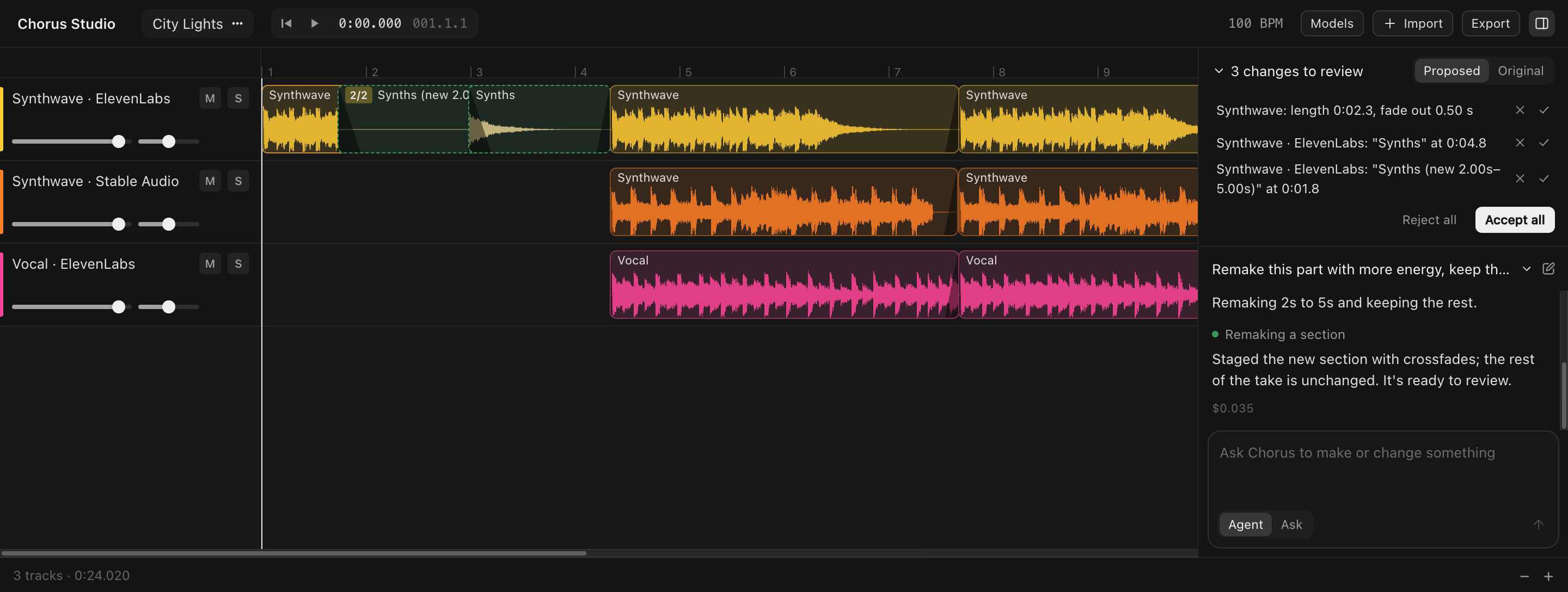
Select a span on the timeline and say what should change. Studio makes a new take for just that span and splices it in with crossfades, so the rest of the song never moves.
Free for macOS, with 100 credits to start. No API keys needed.
How it works
- 1
Select the span
Drag across the ruler to select every track, or across one track's lane for just that track. The selection shows up in the chat.
- 2
Say what should change
"Remake this with more energy" or "same feel, no vocals here". Studio uses the take's own prompt and model unless you name new ones, and can make up to three versions.
- 3
Hear it in place
The new section is spliced in with short crossfades on each side and staged as a proposal. Switch between Proposed and Original while it plays, then accept or reject.
Things to ask
- “Remake this with more energy, keep the rest”
- “Same section, but stripped back to piano”
- “Give me three versions of this bar”
- “Remake this on Lyria instead”
The rest stays put
Only the selected span changes. Everything before and after it is the same audio you had, sample for sample.
The original is take 1
The audio you replaced becomes take 1 in the region's take lanes, so going back is one click.
Any model, per section
Remake a verse on a different model from the rest of the song; each take records which model made it.
Questions
How long does the section have to be?
At least 3 seconds, inside one region. Crossfades are a quarter-second or less on each side, so the join doesn't click.
Does it change anything else in the song?
No. The remake only replaces the span you selected, and it waits as a proposal until you accept it.
What does a remake cost?
The same as a take of that length on the model you use, shown before it runs. It counts toward the daily limit you set.
More in Studio
Your next release starts here.
Free for macOS, with 100 credits to start. No API keys needed.