
 Chorus
Nothing changes until you say so.
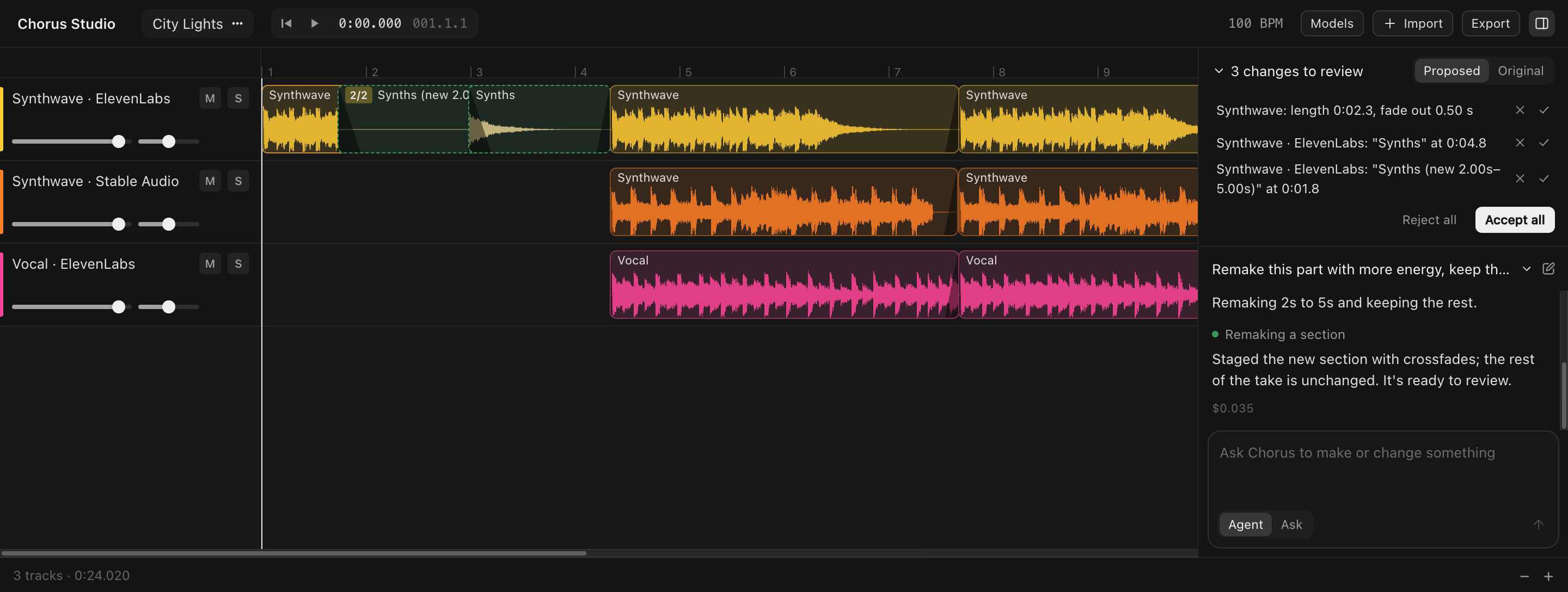
New takes, placements and edits from the agent arrive as proposals. Switch between the proposal and the original while the song plays, then accept or reject each change, or all of them.
Free for macOS, with 100 credits to start. No API keys needed.
How it works
- 1
Ask
Ask for a take, a remake, stems or a mix move. Studio stages everything it makes as changes to review.
- 2
Hear both
Proposed plays the song with the changes; Original plays it without. Switching keeps playing from the playhead.
- 3
Decide
Accept or reject each change, or all of them. Undo and redo cover what you decided, too.
Things to ask
- “Fade the intro in and pull the bed down 3 dB”
- “Place the vocal take at the second chorus”
- “Remake this, but let me compare first”
One change at a time
Each staged change has its own accept and reject, so you can keep the new vocal and drop the fade.
Your hands are direct
Edits you make yourself apply at once. Only what Studio makes for you waits for review.
See the cost first
Every generation is priced before it runs and counted against the daily limit you set.
Questions
What happens to a rejected take?
The change is dropped, but the take stays in the project and the Library in case you want it later.
Is there a spending limit?
Yes. Set a daily limit and a per-request limit in Studio › Settings › Spending. Anything past them is refused before it runs.
Can I just ask questions without changes?
Yes: switch the chat to Ask, and nothing is made or changed.
More in Studio
Your next release starts here.
Free for macOS, with 100 credits to start. No API keys needed.